Google Finance Stock Chart Issue
2013-03-04
Recently the Google Finance Stock Chart got problem: the text inside the chart is blurry, like following:
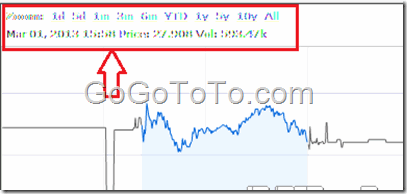 Google Stock chart uses flash, so the reason should be from Google flash plugin.
Let us try to fix it:
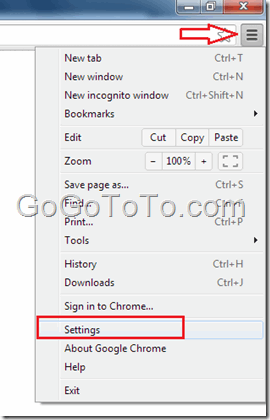
1: On the top right corner, click “Customize and control Google Chrome” icon, and select “Settings” menu item:
Google Stock chart uses flash, so the reason should be from Google flash plugin.
Let us try to fix it:
1: On the top right corner, click “Customize and control Google Chrome” icon, and select “Settings” menu item:
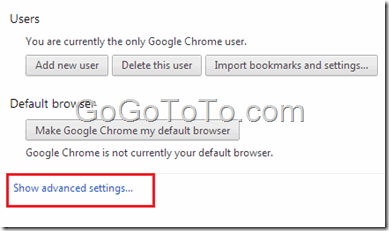
 2: In the Settings windows, scroll to bottom, and select the link “Show advanced settings…”
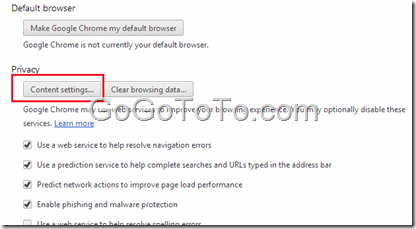
 3: You will see Privacy section, click the button “Content settings…”:
 4: Scroll down to see the Plug-ins section, and click the link “Disable individual plug-ins…”
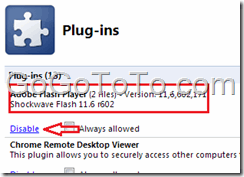
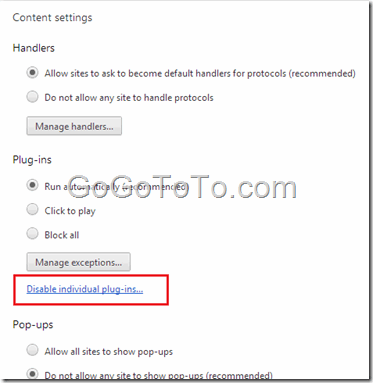 5: In the Plug-ins list, find the Adobe Flash Player, **simply click the Disable link, and then enable it.**
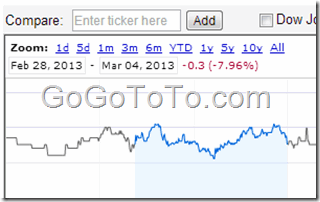
 Now you go to Google finance stock chart page, refresh the page, you will see the blurry issue gone:
 Actually, above steps seems some complicate, for fastest to access Google plugins list page, just input the following content in Google address directly:
chrome://plugins/
Actually, above steps seems some complicate, for fastest to access Google plugins list page, just input the following content in Google address directly:
chrome://plugins/