Several Tips for Moving Websites from Shared Hosting to DreamHost VPS
2018-02-20
We had a chance to use DreamHost’s VPS since we got a task to moving several websites which use DreamHost’s shared hosting to their VPS (Virtual Private Server).
Moving a website from Shared Hosting to VPS could be easy on DreamHost’s platform. For example, you just create a new FTP user based on VPS and change website’s old FTP user to the new user, keep “Move files to the new user” check on, save settings. then everything could be done automatically for you.
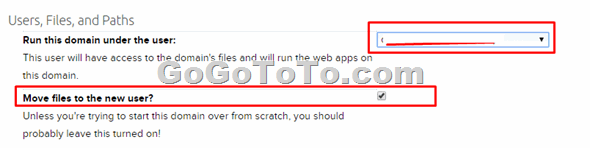 They gives steps here for a single domain moving.
However, we still got several issues during the moving process. Fortunately we could ask their technical support to find out resolved solutions.
## 1. At present, DreamHost’s system **cannot move any websites which is in a subdirectory **on Shared Hosting to VPS automatically.
At present, DreamHost’s system cannot move any websites which is in a “extra” subdirectory (not your website subdirectory) on Shared Hosting to VPS automatically.
For example:
If you have a website named “carsbb.com”, then please check the **Web directory** setting on Control panel, if it is like “/home/username/carsbb” or “/home/username/carsbb.com”, then you will be ok, DreamHost’ system will move this carsbb.com to VPS automatically for you. But, if the Web directory is set as like “/home/username/**xxxxxxx**/carsbb”, then DreamHost’s system can NOT automatically move your website.
What you can do for this case is that you will have to move your website from the extra sub directory to your user root directory first. For example, move “/home/username/**xxxxxxx**/carsbb” to “/home/username/carsbb” . To do this you can first go to control panel and select domain management, remove sub directory section from **Web Directory** setting, just leave directory name in root.
They gives steps here for a single domain moving.
However, we still got several issues during the moving process. Fortunately we could ask their technical support to find out resolved solutions.
## 1. At present, DreamHost’s system **cannot move any websites which is in a subdirectory **on Shared Hosting to VPS automatically.
At present, DreamHost’s system cannot move any websites which is in a “extra” subdirectory (not your website subdirectory) on Shared Hosting to VPS automatically.
For example:
If you have a website named “carsbb.com”, then please check the **Web directory** setting on Control panel, if it is like “/home/username/carsbb” or “/home/username/carsbb.com”, then you will be ok, DreamHost’ system will move this carsbb.com to VPS automatically for you. But, if the Web directory is set as like “/home/username/**xxxxxxx**/carsbb”, then DreamHost’s system can NOT automatically move your website.
What you can do for this case is that you will have to move your website from the extra sub directory to your user root directory first. For example, move “/home/username/**xxxxxxx**/carsbb” to “/home/username/carsbb” . To do this you can first go to control panel and select domain management, remove sub directory section from **Web Directory** setting, just leave directory name in root.  Then you will have to use FTP tool such as FileZilla, use mouse to drag the website folder to user root directory.
Then your website can be moved from sub directory to user root directory.
Then you can use DreamHost’s control panel to set moving this website to VPS, which should be done automatically then.
## 2: After moving to VPS the website’s loading is even slower than it loading on Shared Hosting ?
Why the VPS is even slower than shared hosting is because of a common reason: your database server and VPS server are in the different Data Center. For example, our slowing issue was caused by our VPS server was in US West Data Center but our database server was in US East Data Center. After DreamHost’s tech support helped to move them into same data center, our website can be faster.
## 3: Some WordPress Plugin should be disabled before moving website to VPS.
We had a WordPress blog site uses Super Cache plugin, we did not disable it before we move website to VPS. after the moving process ended, we see some error messages on top of website. The reason could be because we changed server then directory Path was changed, Super Cache can not find old path then gave error or warning messages.
## 4: You might wait longer time than you expected to get new VPS website is visited.
The reason could be variable. Possible reasons including your ISP server will take longer time to get right routine, or, maybe it is because your local router has longer DNS cache time. If it is from router, what you can do is either just waiting without do nothing, or restart your router.
Then you will have to use FTP tool such as FileZilla, use mouse to drag the website folder to user root directory.
Then your website can be moved from sub directory to user root directory.
Then you can use DreamHost’s control panel to set moving this website to VPS, which should be done automatically then.
## 2: After moving to VPS the website’s loading is even slower than it loading on Shared Hosting ?
Why the VPS is even slower than shared hosting is because of a common reason: your database server and VPS server are in the different Data Center. For example, our slowing issue was caused by our VPS server was in US West Data Center but our database server was in US East Data Center. After DreamHost’s tech support helped to move them into same data center, our website can be faster.
## 3: Some WordPress Plugin should be disabled before moving website to VPS.
We had a WordPress blog site uses Super Cache plugin, we did not disable it before we move website to VPS. after the moving process ended, we see some error messages on top of website. The reason could be because we changed server then directory Path was changed, Super Cache can not find old path then gave error or warning messages.
## 4: You might wait longer time than you expected to get new VPS website is visited.
The reason could be variable. Possible reasons including your ISP server will take longer time to get right routine, or, maybe it is because your local router has longer DNS cache time. If it is from router, what you can do is either just waiting without do nothing, or restart your router.